
Conversion-First Navigation: Designing Menus That Drive Action, Not Just Browsing

Most website menus are designed for browsing.
That is the problem.
They focus on listing pages instead of guiding decisions. Users click around, explore, and often leave without taking action.
Navigation should not just help users move. It should help them decide.
This is where conversion-first navigation changes the game.
Instead of acting as a directory, your menu becomes a strategic tool that directs users toward the actions that matter most.
For service-based businesses in Oregon and across the United States, this shift can dramatically increase lead generation without increasing traffic.
What Is Conversion-First Navigation
Conversion-first navigation is the intentional design of your website menu to prioritize actions over exploration.
It focuses on guiding users toward high-value pages and conversion points.
Every menu item has a purpose. Every click leads somewhere meaningful.
Core principles of conversion-first navigation include:
Prioritizing high-converting pages over informational ones
Reducing unnecessary options that create decision fatigue
Structuring navigation around user intent, not internal organization
This transforms your menu into a conversion pathway instead of a content list.
Why Traditional Navigation Fails to Convert
Most websites follow a predictable structure.
Home. About. Services. Blog. Contact.
While familiar, this structure does not always align with how users think or what they want to do.
Common issues with traditional navigation include:
Too many options that overwhelm users
Vague labels that do not communicate value
Lack of emphasis on conversion-focused pages
When users are unsure where to go, they hesitate.
When they hesitate, they leave.
For businesses across the U.S., where competition is high, this friction leads to lost opportunities.
Designing Navigation Around User Intent
Users arrive with a goal.
They are not interested in your site structure. They are looking for solutions.
Your navigation should reflect that.
To align navigation with intent:
Group menu items based on user needs and outcomes
Use clear, action-oriented labels
Highlight the most relevant paths for decision-making
For example, instead of “Services,” a more effective label might be “Get More Leads” or “SEO Services.”
This shifts the focus from browsing to action.
Prioritizing High-Value Pages
Not all pages are equal.
Your navigation should emphasize the pages that drive the most conversions.
These are typically your core service pages.
A conversion-first menu should:
Feature primary services prominently
Limit access to low-priority pages in the main navigation
Guide users toward pages that generate leads
For example, a service business in Oregon should prioritize pages like “SEO Services,” “Web Design,” or “Book a Consultation” over less critical pages.
Visibility drives clicks. Clicks drive conversions.
Reducing Decision Fatigue
More options do not create better experiences.
They create confusion.
Decision fatigue occurs when users are presented with too many choices, making it harder to take action.
To reduce decision fatigue:
Limit the number of main menu items
Group related pages into clear categories
Avoid unnecessary complexity in navigation structure
A streamlined menu helps users focus.
For businesses across the United States, this clarity improves both engagement and conversion rates.
Using Dropdowns Strategically
Dropdown menus can be powerful when used correctly.
They allow you to organize content without overwhelming the main navigation.
However, they must be structured carefully.
Effective dropdown strategies include:
Grouping services under clear, logical categories
Highlighting key pages within the dropdown
Keeping the structure simple and easy to scan
For example, a digital agency might group services under “Solutions” with clear sub-options like SEO, web design, and content strategy.
The goal is clarity, not complexity.
The Role of a Primary Call to Action in Navigation
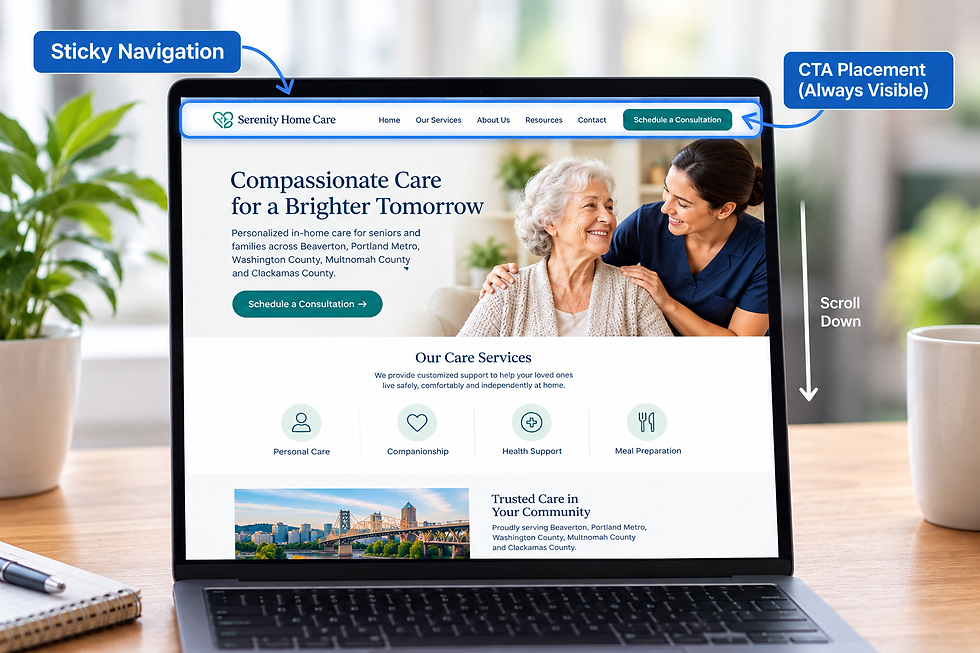
Your navigation should always include a clear, prominent call to action.
This is the action you want users to take.
A strong navigation CTA should:
Stand out visually from other menu items
Use direct, action-oriented language
Be accessible from every page
Examples include “Schedule a Call,” “Get a Quote,” or “Start Now.”
For service businesses in Oregon and across the U.S., this creates a consistent conversion opportunity.
No matter where users are, they know what to do next.
Mobile Navigation and Conversion Behavior
Mobile navigation requires even more precision.
Screen space is limited. Attention spans are shorter.
If your mobile menu is cluttered or confusing, users will not engage.
Mobile-first navigation should:
Prioritize essential menu items only
Ensure easy access to the primary call to action
Maintain clarity and simplicity in design
For many businesses, mobile traffic represents a significant portion of visitors.
Optimizing this experience is non-negotiable.
Aligning Navigation With SEO Strategy
Navigation is not just a UX element. It also impacts SEO.
Search engines use navigation to understand your site structure and prioritize pages.
A well-structured navigation system should:
Reinforce your core service hierarchy
Ensure important pages are easily accessible
Support internal linking across key sections
For businesses targeting Oregon and national markets, this helps strengthen both local and broader SEO performance.
Your navigation becomes part of your ranking strategy.
Measuring Navigation Performance
If your navigation is effective, it will reflect in your data.
Key metrics to monitor include:
Click-through rates on menu items
User flow and navigation paths
Conversion rates from key pages
These insights reveal how users interact with your site and where improvements can be made.
For businesses across the U.S., this data-driven approach ensures continuous optimization.
Common Navigation Mistakes That Hurt Conversions
Even well-designed websites can fail due to poor navigation strategy.
Common mistakes include:
Overloading menus with too many options
Using unclear or generic labels
Hiding important pages behind complex structures
Lack of a visible call to action
These issues create friction and reduce effectiveness.
Fixing them often leads to immediate improvements in user behavior.
Why Navigation Should Be Designed for Action
Navigation is one of the first elements users interact with.
It shapes their experience and influences their decisions.
If it is designed for browsing, users wander.
If it is designed for action, users convert.
For service-based businesses in Oregon and across the United States, this distinction is critical.
Your menu is not just a list of links. It is a strategic tool for growth.
If your website is not converting as expected, your navigation may be part of the problem.
Schedule a strategy consultation with Yber Digitals and design a conversion-first navigation system that drives real results.
Facebook: https://www.facebook.com/yberdigitals


Comments